桌面產品:

加工自動化:

軟體發展:

 
PDF 至 Word 轉換器 客戶
 

提示 & 竅門

在一個單一組中輕鬆地從將一種格式轉換為另一種格式

將多個圖像從一種文件格式改變為另一種對於 Solid Converter GX 而言再容易不過。整個程序僅需幾秒鐘。

第 1 步
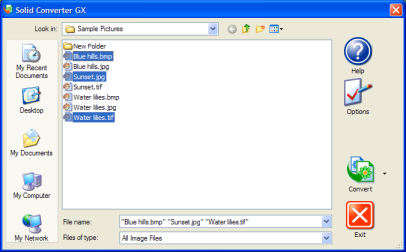
選取圖像文件

在 Solid Converter GX 主熒幕上,按下您的 CTRL 鍵,選取您想轉換的所有圖像。(注意:開始格式不必是同一個 – 比如,您可以混合 BMP、TIF 和 JPG 圖像。)

Solid Capture GX Main Screen

第 2 步
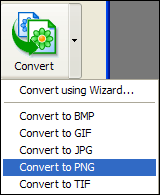
選取轉換產出效果

按一下「轉換」按鈕旁邊的向下箭頭,然後選取您想轉換所有文件的產出效果(比如 PNG)。(注意:不要按下「轉換」按鈕本身。)

Convert button. Menu appears when arrow next to the button is clicked.

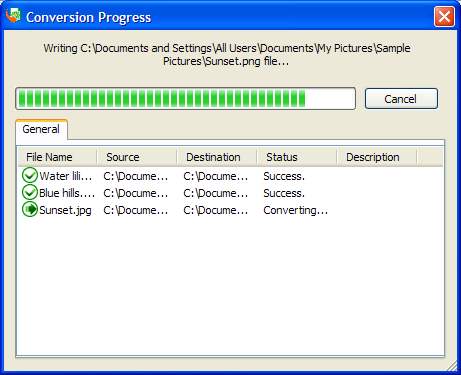
轉換將自動開始。

Depending upon your Options settings, this dialog appears when the conversion takes place.

第 3 步
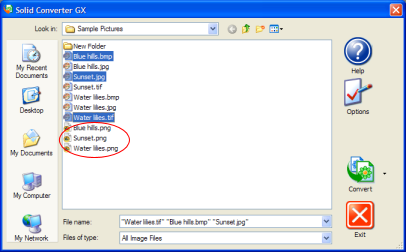
轉換完成

您將看到新的文件出現在與原始文件相同的目錄中。如果需要,您現在可在您的圖像編輯程式中編輯或檢視這些文件。

Solid Capture GX Main Screen after file conversion


We use cookies on this site to enhance your user experience. By continuing to use this website you are giving consent to set cookies. Please see our privacy policy for more details.
©2000-2024 Solid Documents Limited -版權所有