桌面产品:

加工自动化:

软件开发:

 
PDF to Word 转换器 客户
 

提示和窍门

轻松地在一个单组中将图像从一种格式转换为另一种格式

将多个图片从一种文件格式更改为另一种,若使用 Solid Converter GX,是不可思议的简便。全部过程可能只需几秒钟。

第 1 步
选择图片文件

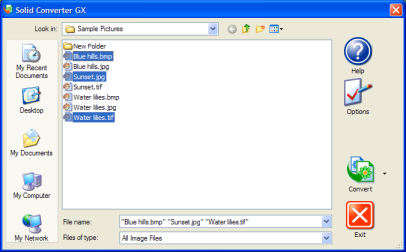
在 Solid Converter GX 的主屏幕上,按下 CTRL 键选择所有您想转换的图片。(注意,开始格式不必相同。比如,您可将 BMP、TIF 和 JPG 图片混起来加工。)

Solid Capture GX Main Screen

第 2 步
选择转换产出格式

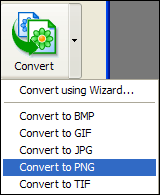
点击 “转换” 按钮旁的向下箭头,然后选择您想将所有文件转换为的产出文件格式(比如 PNG)。(注意:不要点击 “转换” 按钮本身。)

Convert button. Menu appears when arrow next to the button is clicked.

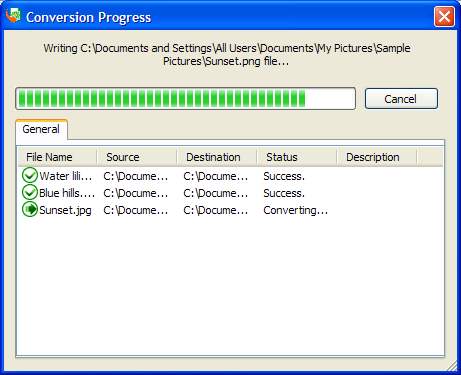
转换将自动开始。

Depending upon your Options settings, this dialog appears when the conversion takes place.

第 3 步
完成转换

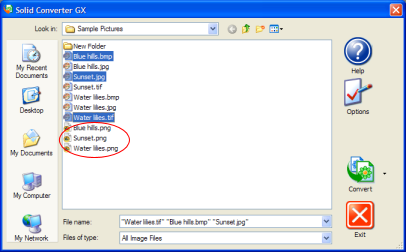
您将看到新建文件出现在与原始文件相同的文件目录中。如果需要,您即可在您的图片编辑程序中编辑或查看该文件。

Solid Capture GX Main Screen after file conversion


We use cookies on this site to enhance your user experience. By continuing to use this website you are giving consent to set cookies. Please see our privacy policy for more details.
©2000-2024 Solid Documents Limited - 版权所有