Geroteerde tekst herstellen
Concerned about converting a PDF containing text that’s crooked, diagonal, or upside-down? Don’t be. Solid Converter PDF gives you the power to convert almost any text from your PDF no matter which way it’s oriented. Below is an example of rotated text:
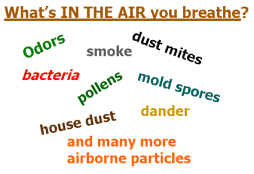
In the example above, most of the text is
not horizontally aligned. Solid Converter PDF makes this text reusable with the following features:
- Rotated text is converted automatically.
- Each line of rotated text is converted into a separate WordArt object.
- Rotated text can be edited after the conversion in Word.
- Solid Converter PDF will convert text that is rotated at ANY angle.
With Solid Converter PDF editing PDF conversions in Word is easier than ever. Now even rotated text can be changed, trouble-free!
| 